A production-ready .NET workspace CLI that turns repeatable development work into safe, inspectable commands
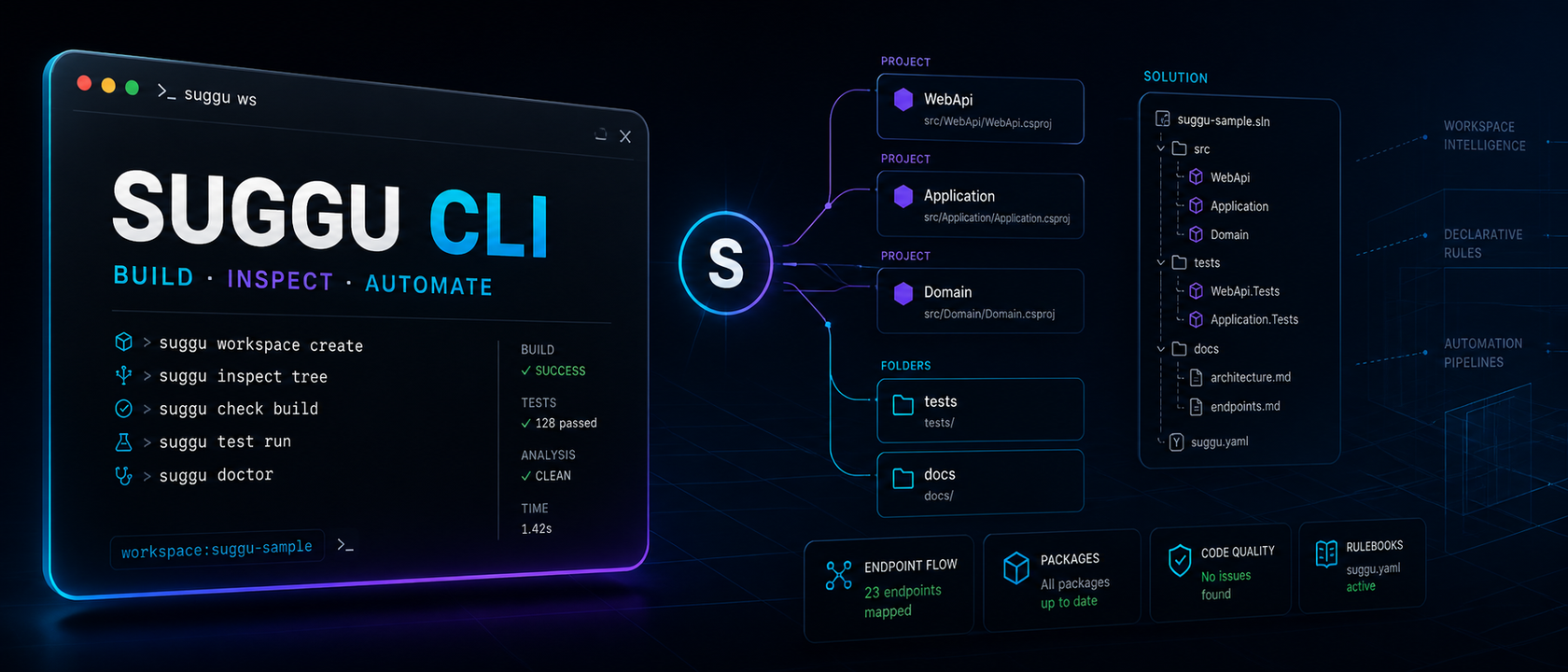
Suggu is a cross-platform .NET 10 productivity CLI for creating, inspecting, and automating filesystem and .NET solution work. It combines guided workflows, diagnostics, static endpoint tracing, and project-owned rulebooks—useful directly in the terminal and as a reliable execution layer for Codex or Claude Code.
- Role
- Solo product — design, architecture, engineering, testing, and release
- Duration
- Ongoing · production-ready at v0.5.3
- Team size
- 1
- Client type
- Open developer tool · .NET productivity
- Stack
Context
Suggu began as a way to remove repeated friction from everyday .NET development: creating projects and source artifacts, navigating solution structure, checking references and builds, tracing endpoint flows, and repeating project-specific setup. The goal was not another opinionated architecture generator. It was a dependable global tool that works with ordinary .NET solutions, preserves existing code, and gives both developers and coding agents a clear, safe command surface.
The problem
Routine development work compounds into meaningful friction: project scaffolding, file and folder operations, reference management, solution inspection, build diagnosis, and repeated architecture setup all interrupt flow. Developers need one predictable tool that works across repositories without forcing a prescribed project structure.
The CLI had to discover ordinary .sln, .slnx, and .csproj contexts across Windows, Linux, and macOS; support both interactive and scripted use; preserve user files by default; provide idempotent planning; and expose useful static analysis without pretending it can prove runtime behavior. It also needed a constrained automation format that coding agents could use safely without arbitrary shell execution.
Constraints
- Architecture-neutral by design: no hard-coded Domain, Application, Infrastructure, or folder conventions.
- Safe by default: preserve existing files, contain paths, preview mutations, and isolate destructive operations.
- Equally usable by humans and automation through guided prompts, explicit arguments, stable output, and dry runs.
What I did
Centralized every mutation into an inspectable plan
Project, file, reference, package, and rulebook operations compile into ordered plans before execution. This enables consistent dry runs, idempotent skips, explicit overwrite behavior, and clear failure reporting across built-in and custom commands.
Built one command surface for creation and inspection
Suggu combines filesystem operations with .NET-aware project discovery, guided source creation, reference and package inspection, build diagnostics, solution reports, file preview, and conservative endpoint-flow tracing.
Added safe, project-owned rulebook automation
A docs/SUGGU-RULEBOOK.md file can define reusable multi-step commands and templates. Recipes can bootstrap complete solutions or repeat local workflows while remaining declarative, contained, previewable, and unable to execute arbitrary shell commands.
Key decisions & tradeoffs
Chose C# on .NET 10 as a global tool over TypeScript/Node or repository-specific shell scripts
- Because
- Suggu targets .NET developers, so a compiled .NET tool integrates naturally with SDK discovery, project XML, solution formats, NuGet distribution, and the runtime already present in its intended environment.
- Tradeoff
- The tool requires the .NET 10 SDK/runtime and follows the .NET release ecosystem, but gains strong cross-platform distribution and first-class access to the platform it manages.
Chose Declarative, allowlisted project rulebooks over arbitrary PowerShell, Bash, or agent-generated setup scripts
- Because
- Structured actions can be validated, dry-run, contained to the workspace, rerun idempotently, and audited before execution. This makes repeatable automation safer for developers and coding agents.
- Tradeoff
- Rulebooks intentionally trade unlimited scripting flexibility for predictability and safety; unsupported workflows must be added as explicit Suggu capabilities.
Results
v0.5.3
Release
58 passing
Automated tests
0 warnings · 0 errors
Build quality
8-project solution
Bootstrap validation
What I’d do differently
The project is now at a genuinely usable stage. Version 0.5.3 runs as a cross-platform .NET global tool, the full suite passes 58 automated tests, and an end-to-end rulebook run successfully bootstrapped and rebuilt an eight-project solution. The strongest design decision was centralizing work into inspectable plans: dry runs, idempotent skips, path containment, and explicit force or removal options make automation predictable. That same predictability makes Suggu especially useful with Codex and Claude Code—the agent can delegate structured workspace operations to Suggu instead of reconstructing fragile shell commands for every repository.
Stack
Next case study