From hand-rolled Nginx to Dokploy: deploying a .NET API on a VPS
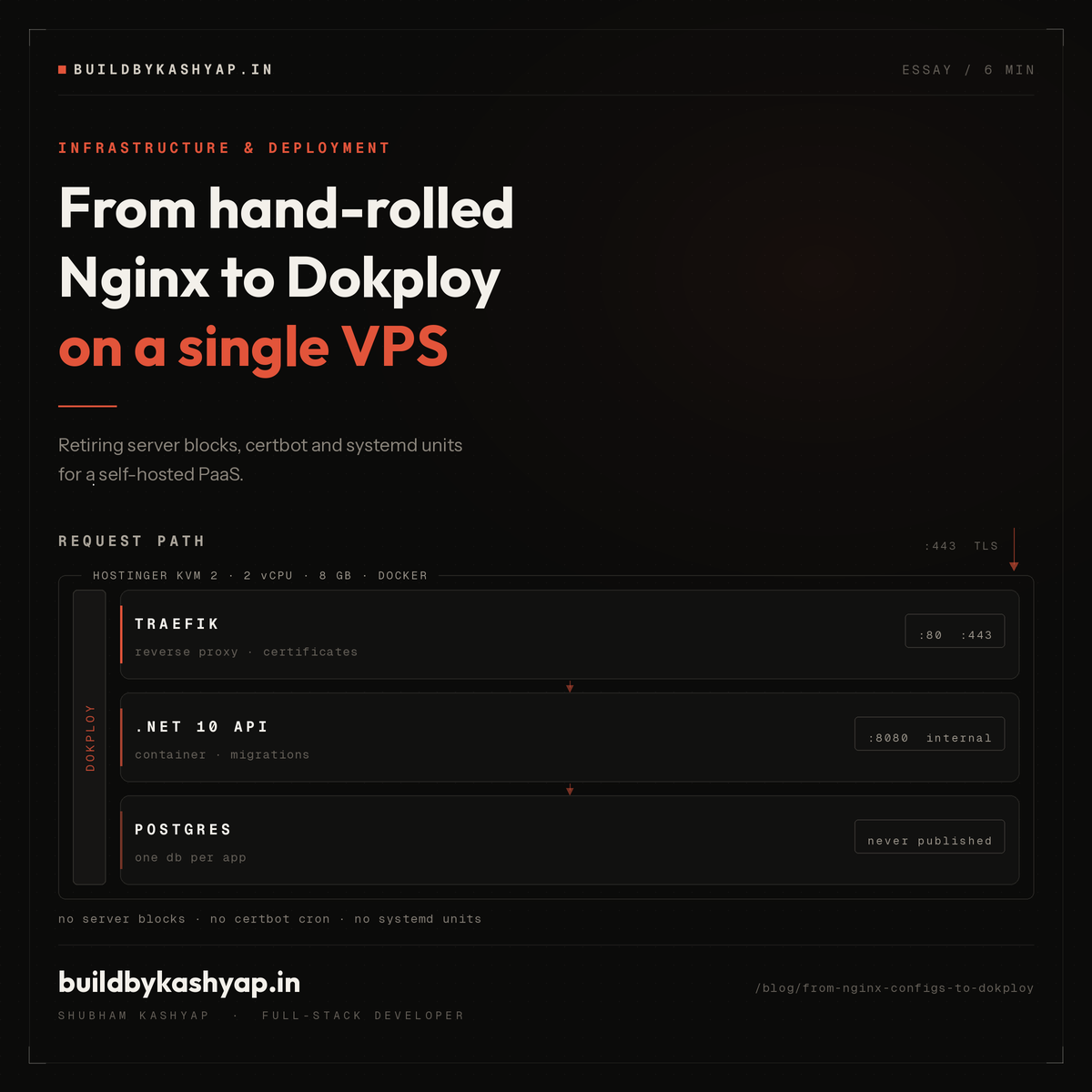
For years I deployed the same way. SSH into the box. Install Nginx. Hand-write a server block. Point it at whatever port the app was listening on. Run certbot and answer its questions. Write a systemd unit. Forget daemon-reload. Remember daemon-reload. Tail the journal until it looked healthy.
It worked, and I got fast at it. But the whole setup lived in exactly one place: that machine. Nothing was written down, nothing was reproducible, and rebuilding it from scratch was an hour of work I would rather not repeat.
I moved this portfolio's API to Dokploy and most of that disappeared. This is what actually changed, and the two things that still caught me out.
What Dokploy actually is
Dokploy is a self-hosted PaaS. You install it on your own VPS with a single command and get a web UI that manages Docker containers, Traefik as the reverse proxy, Let's Encrypt certificates, environment variables, and builds triggered from GitHub.
The important word is self-hosted. It is not a managed platform, so there is no per-seat pricing and no cold starts. It is your VPS, your Docker daemon, your bill. Dokploy is the layer that stops you hand-writing the boring parts.
For context, this API runs on a Hostinger KVM 2 (2 vCPU, 8 GB RAM). That single box hosts the .NET 10 API, a shared Postgres instance, and Dokploy itself, comfortably.
What went away
Nginx config files. I no longer write server blocks. I add a domain in the UI, set the container port, tick HTTPS, and Traefik routes it. The reverse proxy config is derived from the app definition instead of being a separate artifact I have to keep in sync.
Certbot. Certificates are issued and renewed by Traefik. The only prerequisite is that the DNS A record already resolves to the VPS before you ask for the certificate, which is the same constraint certbot had. I just no longer run the command or own the renewal cron.
Systemd units. The app is a container. Restart policy, health checks, and logs are container concerns now, handled by the platform rather than by a unit file I wrote once and never looked at again.
Deploy steps. Dokploy watches the repo through a GitHub App. I push to main, it builds the Dockerfile, and it swaps the container. There is no deploy script, because there is no deploy script to keep working.
What did not go away
Dokploy removes the mechanics, not the decisions. Three things still needed real thought.
The reverse proxy is invisible until it is not
Behind Traefik, TLS terminates at the proxy and every request reaches the container from a Docker network IP. That breaks anything that reads the client IP, which for this API meant the per-IP rate limits: without the forwarded headers, every visitor in the world shares one bucket.
The fix is to honour X-Forwarded-For and X-Forwarded-Proto:
builder.Services.Configure<ForwardedHeadersOptions>(options =>
{
    options.ForwardedHeaders = ForwardedHeaders.XForwardedFor | ForwardedHeaders.XForwardedProto;
    options.KnownIPNetworks.Clear();
    options.KnownProxies.Clear();
});
Clearing the known-proxy list means trusting those headers from any source, which is only safe because the container port is never published directly. Traefik is the sole way in. That is a real assumption, and it is worth writing down next to the code rather than discovering it later.
UseForwardedHeaders() also has to run before anything that reads the IP or the scheme, or the rate limiter and the HTTPS redirect both read the pre-rewrite values.
One Postgres, many databases
The obvious move is a Postgres container per app. On a single box that is mostly waste: several copies of the same engine, each with its own memory overhead, for a portfolio that will never be busy.
I run one shared Postgres service and give each project its own database and its own least-privilege user. The apps reach it over the internal Docker network by service name, so the port is never published to the internet at all. Backups are one job instead of several.
Migrations need an owner
Something has to apply schema changes, and doing it by hand defeats the point. This API applies pending migrations on startup, gated behind a config switch:
Database__ApplyMigrationsOnStartup=true
That is safe here specifically because there is one instance. Two instances booting at once would race each other. If this ever scales horizontally, the switch goes off and migrations move to a deliberate step. Encoding the reason in the config rather than the habit is the part that matters.
The gotcha that cost me an evening
Everything in Dokploy is configured through environment variables in a UI text box, and .NET reads nested config with a double underscore as the section separator:
AdminCredential__Email=you@example.com
I had a key written as AdminCredential:Email instead. Single colon, and a trailing space before the equals sign. That variable binds to nothing. The app booted perfectly, ran fine, and rejected every single admin login, because it was running with a completely different credential than the one I thought I had set.
Two lessons, both about the same thing.
A trailing space in a key is invisible. Panel UIs do not show whitespace, and nothing warns you. The value looks right because it is right; the key is what is broken.
A config error that boots successfully is the worst kind. The API returned a deliberately vague 401 for every failed login, which is correct security behaviour and completely useless for diagnosis. A wrong password and a credential that never loaded looked identical from both ends.
So I fixed the class of problem rather than the instance. The app now trims whitespace and stray quotes off configured values, refuses to start if the credential is missing or malformed, and logs one line at boot naming what it actually loaded:
Admin credential loaded. Email=you@example.com; PasswordSource=Plaintext;
HashIsWellFormed=True; ValuesWereNormalised=False;
No secrets in there, just enough to answer "is the thing I set the thing that loaded". That line would have turned an evening into thirty seconds.
Would I go back?
No. The honest summary is that Dokploy did not make deployment simple, it made the simple parts stop needing my attention. Nginx and certbot were never the interesting problems, they were just the ones I kept re-solving.
What is left is the set of decisions that were always mine to make: how the proxy passes through client identity, how the database is shared, when schema changes apply. Those did not get easier. They just became the only thing on the list.
If you are running a handful of small services on one VPS and you are still hand-writing server blocks, this is worth an afternoon.
More from the blog
More on the same themes as this post.
Five open-source tools later, I think I'm dependent — and I can't tell if that's a problem
Blob Storage 101: Cost, Cloud vs Self-Hosting, and Why I Moved from MinIO to RustFS