IntersectionObserver Not Firing? My Blog Was Blank on Phones for a Month
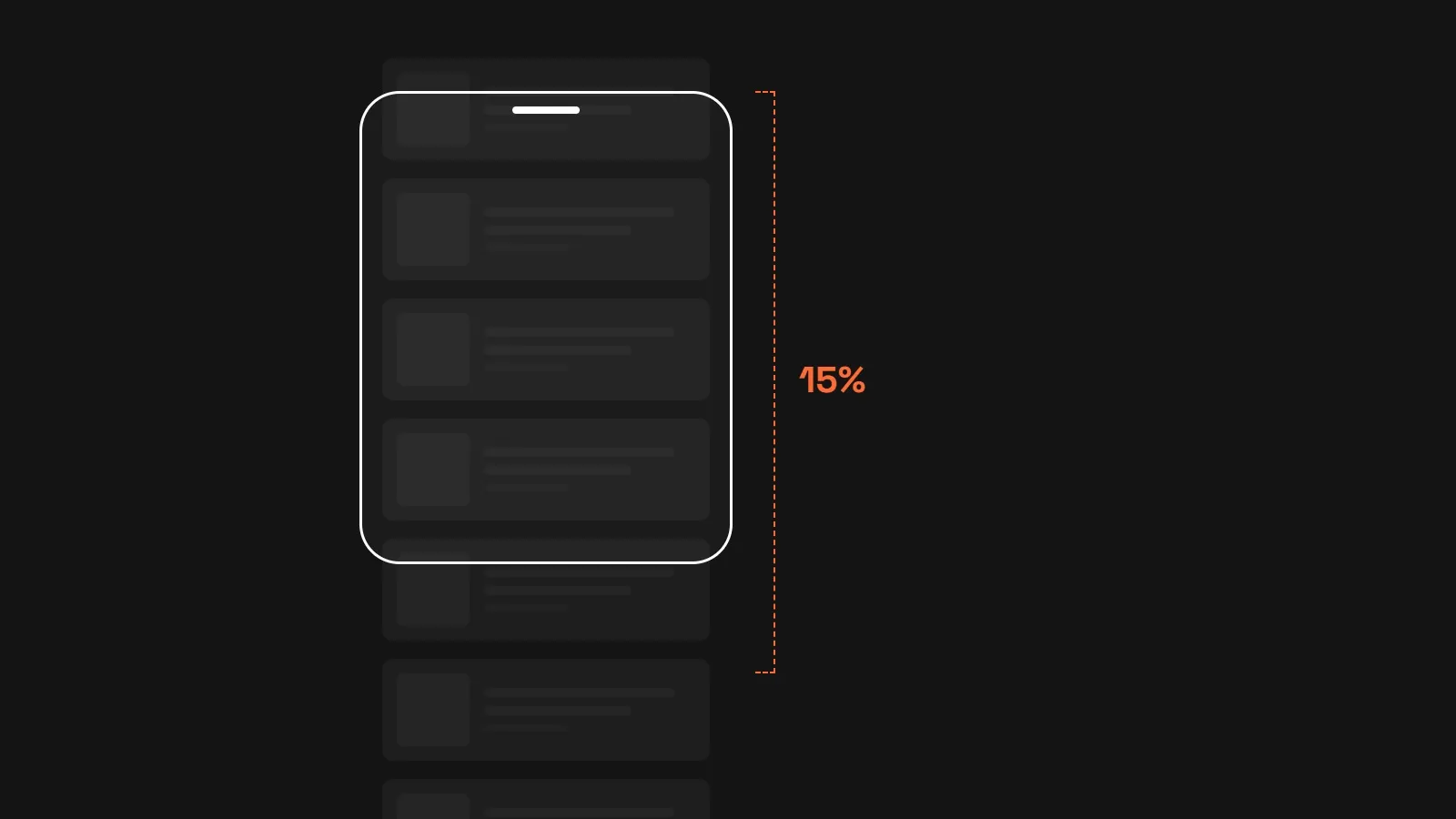
On 3 November 2026 I opened my own blog on a phone and it was empty. The header was there, the search box was there, the topic chips were there, and below them was a long stretch of dark nothing. On desktop, every post showed up fine. The bug shipped with a new list layout on 2 October, so for 32 days every phone visitor saw a blog with no posts on it.
The posts hadn't failed to load. They were in the prerendered HTML, in the DOM, with their cover images downloaded. All of them were sitting at opacity 0. If your IntersectionObserver isn't firing on a tall element, the cause is probably what caught me: a threshold ratio that the element can never physically reach on a small screen. This post is the maths, the fix, and why my unit tests passed the whole time.
What's inside
- The symptom: posts in the DOM, nothing on screen
- Finding the element that was hiding everything
- The maths: why 15% was impossible
- Why desktop was fine
- The fix
- Why the tests didn't catch it
- Other ways to avoid this
- FAQ
1. The symptom: posts in the DOM, nothing on screen
This site is Angular, prerendered to static HTML. The blog index lists every post as a card. On a phone-sized window (I reproduced it at 425 × 859 in Chrome DevTools), the page rendered the intro section and then nothing for thousands of pixels. The page was still long, about 13,100px. You could scroll through all of it and see nothing.
That combination, a long scrollable page with nothing visible, is a strong hint. The content is there and something is hiding it. A failed API call gives you a short page. This was the opposite.
2. Finding the element that was hiding everything
I ran a quick script in the console to walk from the first post link up to the page root and print the computed styles of every ancestor:
let el = document.querySelector('.blog__result-link');
while (el && el !== document.body) {
  const cs = getComputedStyle(el);
  console.log(el.tagName, el.className, cs.opacity, cs.transform);
  el = el.parentElement;
}
The link itself had opacity 1. So did its <li>. Its parent, the <ol class="blog__results pf-reveal">, had opacity 0 and a 40px translateY. That's the starting state of my scroll-reveal animation. The class that ends it, pf-reveal--visible, had never been added.
The directive behind it is small. It adds the hidden class, then waits for an IntersectionObserver to say the element is on screen:
const observer = new IntersectionObserver(
  ([entry]) => {
    if (entry?.isIntersecting) {
      el.classList.add('pf-reveal--visible');
      observer.unobserve(el);
    }
  },
  { rootMargin: '0px 0px -12% 0px', threshold: 0.15 },
);
threshold: 0.15 means: call me back when 15% of the element is inside the root. With a normal card, that's a pleasant "reveal when it's properly in view". I'd put the same directive on the entire list.
3. The maths: why 15% was impossible
Here are the real numbers from that phone-sized window:
| Measurement | Value |
|---|---|
Height of the post list (<ol>) |
11,812px |
| 15% of the list | 1,772px |
| Viewport height | 859px |
Root after rootMargin bottom -12% |
756px |
| Highest possible visible ratio | 756 ÷ 11,812 = 6.4% |
For 15% of the list to be inside the root, 1,772px of it would have to fit in a 756px window. It can't, on any scroll position, ever. The observer's callback does fire as the list enters, but with a ratio below 0.15, and the browser never crosses the 0.15 threshold, so the reveal never runs.
This is the general rule worth remembering: an element taller than rootHeight ÷ threshold can never reach that threshold. At 0.15 and a 756px root, that's anything over about 5,040px. A long list on a phone passes that easily.
4. Why desktop was fine
On a wide screen the blog uses a multi-column grid, so the same 20 posts stack into a much shorter list. Short enough that 15% of it fits in the window, the threshold is crossed, and the list fades in exactly as designed.
So the bug only existed where the layout became a single column, which is the layout most of my readers use. I'd checked the reveal animation on desktop, where it looked great.
5. The fix
I had two options: move the directive off the list onto each card, or make the directive handle tall elements. I did the second, because any future section that gets long on mobile would hit the same wall.
The observer now listens at two thresholds, 0 and 0.15. When an element enters the root, the callback checks whether it's taller than the viewport. If it is, it reveals immediately. If it isn't, it keeps waiting for 15% like before:
const REVEAL_RATIO = 0.15;

const observer = new IntersectionObserver(
  ([entry]) => {
    if (!entry?.isIntersecting) return;
    const tall = entry.boundingClientRect.height > window.innerHeight;
    if (tall || entry.intersectionRatio >= REVEAL_RATIO) {
      el.classList.add('pf-reveal--visible');
      observer.unobserve(el);
    }
  },
  { rootMargin: '0px 0px -12% 0px', threshold: [0, REVEAL_RATIO] },
);
The 0 in the threshold array matters. Without it, the browser only calls back when the ratio crosses 0.15, which for a tall element never happens, so the height check would never get a chance to run.
Short cards still get the same reveal timing. The list now fades in as soon as its top edge enters the screen. I verified it at 425px wide on the dev server: the <ol> gets pf-reveal--visible, opacity goes to 1, and all the posts show.
This is the second time this directive has bitten me. Back in August it caused the opposite problem: the hero section, which is visible on load, briefly flashed out and back in during hydration because the directive hid it before deciding it was on screen. The fix then was to check the element's position first and skip the hidden state for anything already in view. Scroll animations touch every page, so they're worth testing at more than one screen size.
6. Why the tests didn't catch it
The directive had a spec, and it passed. Here's the fake observer it used:
intersect(isIntersecting: boolean): void {
  this.callback(
    [{ isIntersecting } as IntersectionObserverEntry],
    this as unknown as IntersectionObserver,
  );
}
It reported isIntersecting and nothing else. No intersectionRatio, no boundingClientRect. The test effectively said "when the browser says it's visible, reveal it", which was true and beside the point. The browser decides when to call back based on the ratio, and the fake skipped that decision entirely.
The updated fake passes a ratio and a height, and there are two new tests: a normal 200px element at a ratio of 0.05 must stay hidden until 0.15, and an element ten viewports tall at a ratio of 0.01 must reveal on entry. A test double that leaves out the input the bug depends on can't catch that bug.
7. Other ways to avoid this
- Reveal items, not containers. Putting the directive on each card instead of the list avoids the problem and gives you a nicer staggered entrance. Mind the cost: twenty observers instead of one is still cheap, but don't do it for a thousand rows.
- Use
threshold: 0with a rootMargin. A negative bottom margin like-12%already delays the reveal until the element is properly on screen, without a ratio. - CSS scroll-driven animations.
animation-timeline: view()can fade elements in with no JavaScript at all. Check browser support for your audience and keep a visible fallback. - Make the hidden state opt-in. If JavaScript fails, a
pf-revealclass added by script never appears, so content stays visible. Mine already worked this way, which is why the prerendered HTML looked fine to crawlers. People were the only ones who couldn't see it. - Respect reduced motion. Anyone with
prefers-reduced-motionshould skip the animation entirely.
If you're building an Angular site and wondering where code like this should live, I wrote about structuring an Angular frontend. This bug is one of several that only appeared in production on a prerendered Angular site. I've collected the others in Angular prerendering in production: 5 bugs that only showed up live.
FAQ
Why is my IntersectionObserver callback not firing?
Check three things: the element is actually being observed, the root is the scrolling container you think it is, and the threshold is reachable. A threshold of 0.5 on an element twice the viewport height can never fire.
What does threshold mean in IntersectionObserver?
It's the fraction of the target element that must be inside the root before the callback runs. 0 fires as soon as one pixel is visible, 1 only when the whole element is visible. You can pass an array to get callbacks at several points.
How do I observe an element taller than the viewport?
Use threshold: 0, or a small array like [0, 0.15], and decide in the callback using boundingClientRect.height and intersectionRatio. Never rely on a single ratio for elements whose height changes with screen size.
Does hiding content with opacity 0 hurt SEO?
Content in the HTML is still crawled, but people can't read it, and a page that looks empty on mobile will lose visitors fast. Make sure the visible state doesn't depend on an animation that might never run.
Got a bug that only shows up on one device?
I build and fix Angular and .NET apps for founders and small teams. If something in your app works on your machine and nowhere else, send me the details.
More from the blog
Other write-ups from the same workbench.

Angular Prerendering in Production: 5 Bugs That Only Showed Up Live
Automated Postgres Backups on a VPS: Your RustFS Bucket Doesn't Count