How I Built a WhatsApp AI Chatbot Without the Official API (and Kept the Number From Getting Banned)
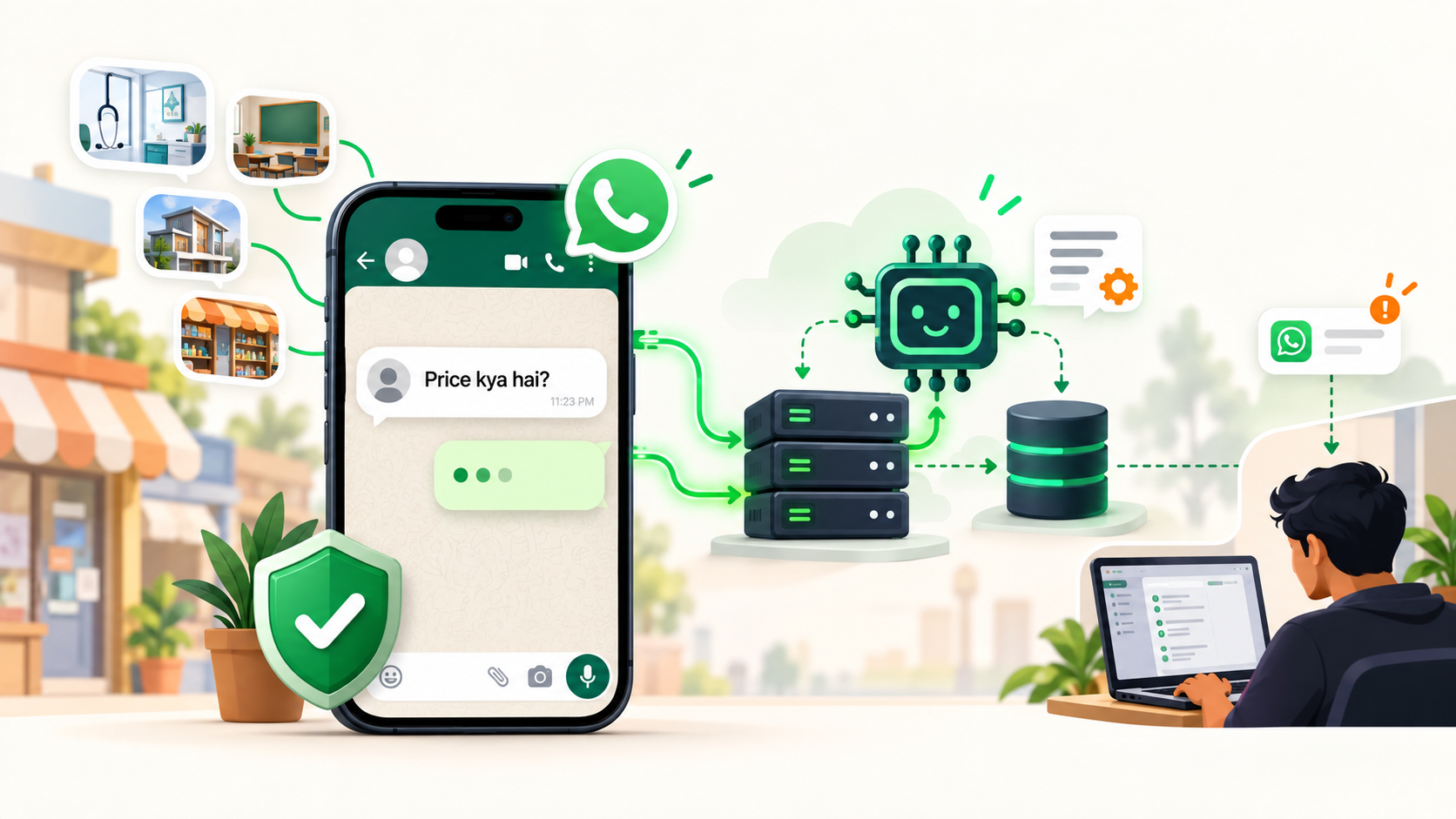
In India, a lot of small businesses run on WhatsApp, not email. A clinic, a coaching institute, a real-estate agent: their customers message at 11 p.m. asking "price kya hai?", and whoever answers first often gets the job.
So I built an assistant for my own business number that answers instantly, 24/7, in a way that sounds like a person and hands the chat to me when it matters. This post is how I built it with WAHA, ASP.NET Core and an AI model, what it actually costs, and the rules I follow so the number doesn't get banned.
You can try the live bot yourself: message +91 77380 98348 on WhatsApp.
Official WhatsApp API vs a linked device: pick first
There are two ways to automate a WhatsApp number, and the choice decides everything else.
| WhatsApp Cloud API (official) | Linked device via WAHA (unofficial) | |
|---|---|---|
| Setup | Meta Business verification, app review, a number not used on the phone app | Scan a QR code, like WhatsApp Web |
| Cost | Meta charges for business-initiated messages; replies inside the 24-hour window are cheap or free | Free (WAHA Core is open source); you pay only for your server |
| Buttons, lists, image templates | Yes, with pre-approved templates | Mostly no. Buttons don't show for non-official numbers |
| Cold outreach | Allowed with approved templates and opt-in | Will get your number banned |
| Ban risk | Low if you follow the policy | Real. WhatsApp's terms don't allow unofficial clients |
| Best for | High volume, marketing campaigns, businesses that need buttons | A small business that mostly answers people who message first |
I chose WAHA because my bot only answers inbound messages, I already had a VPS, and I wanted it working the same day. If you plan to message strangers, stop here and use the Cloud API.
The architecture
Customer ──message──▶ my WhatsApp number
                         │
                         ▼
               WAHA (Docker on my VPS, NOWEB engine)
                         │  webhook, HMAC-signed
                         ▼
               ASP.NET Core API  POST /whatsapp/webhook
                 ├─ verify signature, drop groups, status and duplicates
                 ├─ queue it, answer the webhook in milliseconds
                 └─ background worker:
                      ├─ plan the reply: menu, option, keyword or AI
                      ├─ mark seen → "typing…" 2–6 s → send
                      └─ hand-off? → WhatsApp alert to my own phone
A few decisions that matter more than they look:
- Answer the webhook fast, reply in a worker. WAHA retries a webhook it thinks failed. If you call an AI model inside the request, a slow answer means a retry, and a retry means the customer gets two replies.
- Every message id is stored with a unique index. A retried webhook hits the index and is ignored. The database guarantees "one reply", not an
ifin code. - The bot records its own replies under the id WhatsApp will echo back. Your own sent messages come back through the webhook. If the bot can't tell its echo from you typing on the phone, it will think you took over, or worse, reply to itself.
When I reply by hand, the bot goes quiet
This is the part I would insist on in any WhatsApp bot. If I type a reply on my phone, the bot sees a message from my number that it didn't send, and it pauses in that chat for a few hours. No bot talking over a real conversation. From the admin panel I can resume it early.
The same idea applies to team numbers: numbers saved as team members never get customer replies. Instead they can send short commands like today, leads or chats and get live numbers back.
The AI part (and what it costs)
Free-text questions go to an AI model through an OpenAI-compatible API (I use DeepSeek; OpenAI works the same way). The prompt contains:
- The website's own content: services, pricing and FAQs, pulled from the same database the site uses, so the bot never contradicts the website.
- A "business info" box I edit in the admin panel, for things not on the site (payment methods, offers, working hours).
- The last few messages of the chat.
The model must answer in JSON: the reply text, plus flags for "needs a human" and "off-topic or spam". If it asks for a human, I get a WhatsApp alert with a one-line summary.
Cost: at the rates I pay (about $0.30 per million input tokens and $1.20 per million output tokens), a typical reply uses around 2,000 input and 150 output tokens. That is about $0.0008, less than ten paise per reply. The admin panel tracks every call, so I can see the real number.
Guard rails, so nobody burns your tokens:
- A cap on AI replies per chat per day, and a global daily cap. Above it, the bot falls back to the menu.
- Off-topic and spam messages count as strikes. Too many and the bot stops answering that chat for a while.
- More than a few messages in five minutes counts as flooding and gets the same treatment.
- If the AI provider fails or times out, the bot answers from the menu rules instead of going silent.
Indian numbers (+91) see prices in rupees and everyone else sees dollars, using the same price list as the website.
The ban-safety rules I actually follow
These rules are worth more than the code. Most "my number got banned" stories break one of them.
- Only reply to people who messaged first. No cold messages from the linked number, ever.
- Warm up a new number. Use it like a normal person for a few days before any automation.
- Never reply instantly. Mark as seen, show "typing…", wait a couple of seconds based on the reply's length, then send.
- Send the welcome menu at most once per chat per day. Repeating the same block of text looks like a bot.
- Keep the phone online. A linked device depends on the phone; if it's offline too long, the session drops and you have to scan the QR again.
- Use a separate business number. If something goes wrong, your personal WhatsApp is untouched.
- Broadcasts only to people who know you. When I send an offer, it goes only to people who messaged before or contacts I add by hand: at most 50 a day, a random few minutes apart, only in business hours, with "Reply STOP to stop these messages" on every one. Anyone who says STOP is never messaged again.
What it runs on
- WAHA Core in Docker, about 300 MB of RAM, on the VPS that already hosts my site.
- ASP.NET Core for the webhook, the bot logic and the admin API, with PostgreSQL for chats, messages and AI usage.
- Angular admin panel for the bot's text, the menu, the AI key, the team and the chat history.
- Daily backups of the WhatsApp session, so a server problem doesn't mean scanning the QR again.
No new SaaS subscription, and the only per-message cost is the AI, measured in paise.
When I would use the official API instead
- You need to start conversations: reminders, order updates, marketing to a list.
- You want buttons, lists or image-header templates that look like big brands' messages.
- You handle thousands of chats a day, or several agents share one number.
For a clinic, a tutor, a consultant or a shop that mostly answers questions, the linked-device route works well if you respect the rules above.
FAQ
Is WAHA allowed by WhatsApp? WAHA works like WhatsApp Web, but WhatsApp's terms don't permit unofficial automated clients. It's widely used, but the risk is yours. Keep it to replies and follow the rules above.
Will my number get banned? Numbers get banned for spam-like behaviour: messaging strangers, sending the same text to many people fast, getting reported. A bot that only answers people who wrote first, at a human pace, is a very different pattern.
Can I send bulk messages with it? Not to strangers. Small, slow broadcasts to existing contacts with an easy opt-out are workable. For real bulk marketing, use the official Cloud API.
How much does it cost to run? If you already have a server: nothing extra for WAHA Core, plus a few paise per AI reply. A small VPS is enough to run it.
Can it work in Hindi or Marathi? Yes. The AI answers in the customer's language, and the menu texts are yours to write.
Want a WhatsApp assistant like this for your business, trained on your own services and prices? Get in touch, or message the bot at +91 77380 98348 and ask it how it works.
More from the blog
More on the same themes as this post.
Meet Suggu: safe .NET workspace automation from the terminal
Blob Storage 101: Cost, Cloud vs Self-Hosting, and Why I Moved from MinIO to RustFS